Showing posts with label ด้านการจัดการไฟล์ ( แปลงไฟล์ ). Show all posts

Wednesday, December 7, 2011

Print2PDF Ver. 9.1.11 Build 0421


Print2PDF Ver. 9.1.11 Build 0421
Print2PDF  ให้คุณสามารถพิมพ์เอกสารออกมาในรูปแบบของไฟล์ PDF จากทุกๆ Application ที่สามารถสั่งพิมพ์ได้อย่างง่ายๆ เลยครับ เรียกได้ว่าถ้าโปรแกรมไหนมีเมนูให้คุณ Print งานออกมาได้แล้วล่ะก้อ คุณก็สามารถ Export มันออกมาให้เป็นเอกสารในรูปแบบของไฟล์ PDF ได้ ..ซึ่งผมรับรองว่าโปรแกรมนี้จะช่วยอำนวยความสะดวกให้คุณประหยัดเวลาไปได้มากเลยล่ะครับผม  ^__^
Release Date : 21/04/2011

ScreenShots
PDF/A conversion

Provide network PDF creation and distribute conversion profiles

Automatic PDF conversion from watched folders and emails

Digital Time Stamp Support

Batch convert multiple do-cuments to PDFs

Homepage : http://www.software602.com/pdf-products/print2pdf
Requirements : Windows XP/Vista/7or Windows Server 2003/2008
ภาษาอังกฤษ ดูคุณสมบัติกันแบบละเอียดได้เลยครับ
Overviews : รายละเอียดของโปรแกรม
Supports the 19005-1 PDF/A archive standard
The PDF/A archive standard ensures that PDF files created today will be usable for years to come. Creates PDF files that are compliant with the new public specification from the International Standards Organization.
Windows Vista and Microsoft Office 2007 ready
Native 64-bit (x64) print driver support along with Windows Vista Windows Server 2008 and Microsoft Office 2007 compatibility will provide you a safe investment in PDF technology well into the future.
Profile support and built-in profiles
Easily control how you create Adobe PDF files. The included built-in profiles provides one-click access to create PDF/A-1b High Quality Output Smallest File Size Watermarked and Standard PDF output.
Create fully compatible Adobe PDF files
Print2PDF creates Adobe PDF compatible do-cuments that are viewable with the FREE Adobe Reader. PDF do-cuments will look exactly as you intended and can be viewed on a broad range of operating systems.
Easy software distribution
Share the print driver from any Windows computer or prepare a client installation for distribution from a flash drive. Once the print driver has been installed on the client future connections to the server are not required and all conversion is performed on the client workstation.
Complete client control with profile support
Control how your users will create PDF files in your organization. Configure default settings output folder & filenames and decide if Microsoft Office and Internet Explorer integration is available.
Supports Terminal Services and Citrix
Reduce your administration costs by centralizing PDF creation on Terminal Services or Citrix MetaFrame Presentation Server. Please read the Citrix MetaFrame Installation Guide for more information.
Batch convert multiple do-cuments to PDF
Save time and convert multiple office do-cuments using the included GUI application or command-line utility to automate conversion on the server. Output PDF files keep the original name to further automate the process.
Supports application integration
Easily add PDF output capability to your application. Print2PDF includes a simple configuration utility to automate conversion. Read the Developer Guide to learn how to integrate Print2PDF into your application.
Merge multiple do-cuments into a single PDF
Create a single PDF from multiple sources (web pages Microsoft Word) to deliver one do-cument that anyone can open using the FREE Adobe Reader software. Append before after or in the middle of a PDF file.
Sign PDF do-cuments with a Digital ID
Sign electronic do-cuments using a digital signature to verify your identity and provide tamper-resistance. Integration with the Windows Certificate Store provides one-click access to your digital signatures.
Secure PDF do-cuments with encryption
Strong PDF security with 40-bit or 128-bit RC4 encryption secures your private do-cument s content. Use this industry accepted encryption standard to easily protect any do-cument.
Authorize PDF access with password protection
Print2PDF supports two levels of password protection. A password can be configured to protect the do-cument upon opening and a different password can be defined to control any do-cument changes.
Easily control PDF content through permissions
Use PDF do-cument permissions to allow or deny do-cument printing changing the do-cument content copying and adding or changing comments & form fields to effectively control the do-cument content.
Create PDF files optimized for the web
Provides the ability to optimize PDF files for quick viewing through the web (fast web view). The linearization process will allow viewers to begin reading the do-cument before it has been completley downloaded.
Includes Integrated SMTP Client
Use the built-in SMTP client to send an e-mail with the PDF attachment to a designated SMTP server. No default e-mail client is required.
Enhance do-cuments with a stamp or watermark
Use the Stamp function to brand your do-cuments by ing an image of a stamp signature or company logo. Easily classify do-cuments with a text watermark (e.g.  Draft   Classified  etc.).
Simple PDF conversion from Microsoft Word
With the included macro easily convert any do-cument into PDF with hyperlink and bookmark support. Toolbar integration with Microsoft Word provides quick one-click conversion.
Add metadata to a PDF do-cument
Control the metadata that is saved to PDF. Easily add a title subject author and keywords to quickly find the do-cument you need within your do-cument management system. Also supports XMP metadata.
Choose PDF do-cument print quality
Choose the resolution (96 to 2400 DPI) to optimize print quality and do-cument file size. Use multiple image compression options to preserve the integrity of the images in the PDF do-cument.

Wednesday, June 15, 2011

VSO ConvertXtoDVD Ver. 4.1.19


VSO ConvertXtoDVD Ver. 4.1.19 Build 365 Final
โปรแกรมจากค่ายดังสัญชาติฝรั่งเศส สำหรับแปลงวีดีโอไฟล์เป็น DVD เพื่อนำไปไรท์และชมกับเครื่องเล่น DVD ได้ทันที สามารถฝังซับไตเติ้ลต่างๆ ที่คุณต้องการลงไปบนไฟล์วีดีโอได้ด้วย สนับสนุนนามสกุลมากมาย ดังนี้ avi | divx | xvid | mov | mkv | flv | mpeg-1 | mpeg-2 | mpeg-4 | nsv | dvr-ms | tivo | ts | ifo | vob | asf | wmv | realmedia | rm | rmvb | ogm | existing files from digital camcorders | TV/Sat | capture cards | etc. สนใจก็เอาไปลองใช้กันดูครับ  ^__^
Release Date : 11/05/2011

ScreenShots
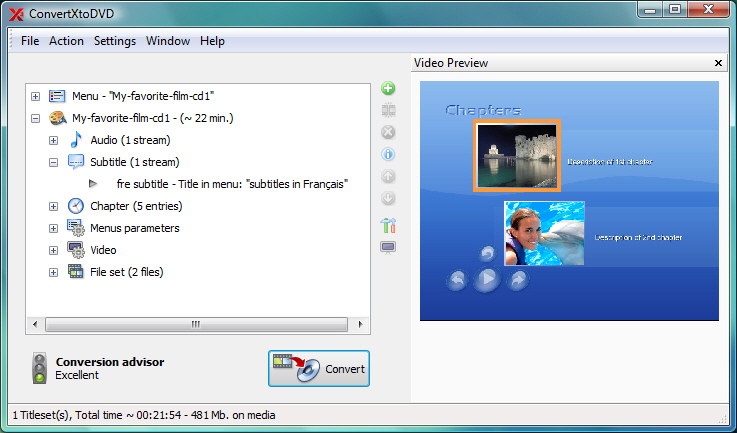
ConvertXtoDVD Chapter

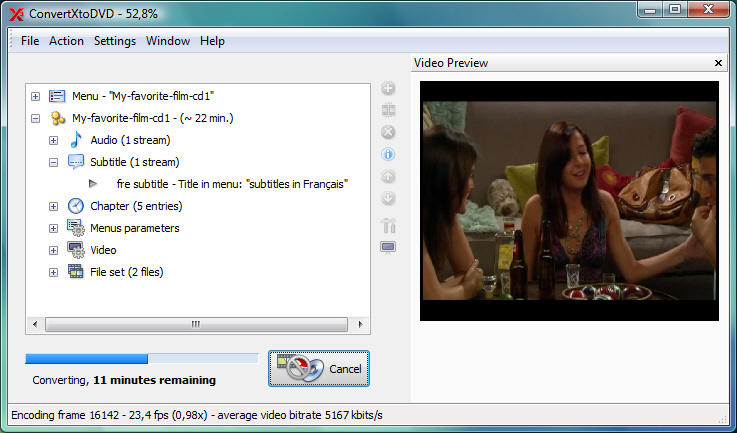
ConvertXtoDVD Process

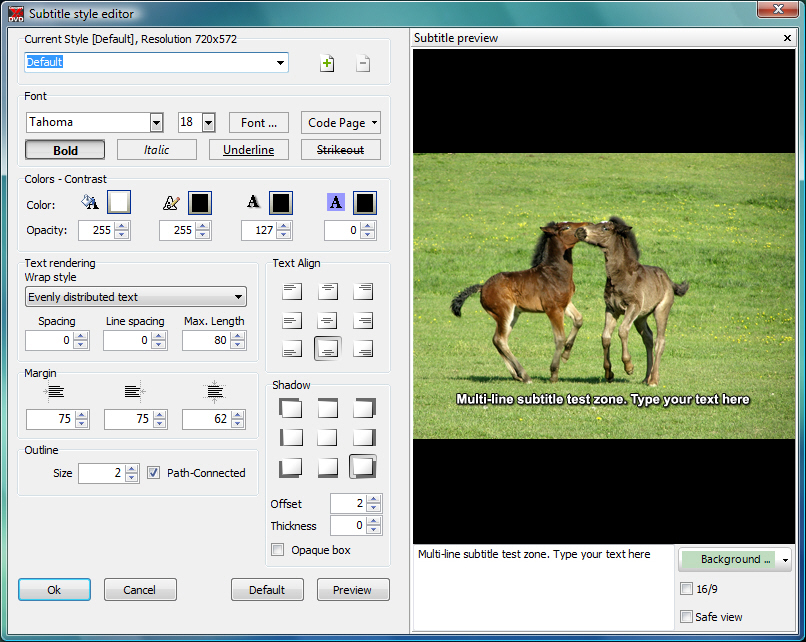
ConvertXtoDVD Subtitle style editor


Homepage : http://www.vso-software.fr/products/convert_x_to_dvd/
Optimized for : Windows 2000/XP/Vista and 7
ภาษาอังกฤษ ดูคุณสมบัติกันได้เลยจ้า
FEATURES : คุณสมบัติของโปรแกรม
• Video formats supported : avi/divx/xvid/mov/mkv/flv/mpeg-1/mpeg2-/mpeg-4/nsv/dvr-ms/tivo/ts/ifo/vob/asf/wmv/realmedia/rm/rmvb/ogm existing files from digital camcorders TV/Sat capture cards etc. No external codecs needed like avi codec download
• Create DVD menus with different templates available possibility to add background video image or audio have chapter and audio/subtitle menus
• Conversion advisor wizard control of the conversion speed vs. quality
• Fast and quality encoder typically less than 1 hour for converting 1 movie and supports Multi-Core processors!
• Included burning engine with burn speed control choice of SAO or packet writing methods supports all DVD formats
• Custom and or automatic chapter creation with markers and preview window
• Advanced file merging possibilities
• Audio formats supported internal and external : AC3/DTS/PCM/OGG/MP3/WMA and more...
• Subtitles files supported internal and external : SRT/SUB/IDX/SSA with color and font selection and supports tags like italic bold
• Video output for video standard (NTSC PAL) TV Screen (Widescreen 16 : 9 Fullscreen 4 : 3) and DVD Resolution (Full D1 Boradcast D1 Half D1 SIF) or choose automatic for all choices listed above. Also convert video from NTSC to PAL or PAL to NTSC
• Video post processing s-ttings like video resize-pad/cropping and de-interlacing options
• Multilingual support
Changes in ConvertXtoDVD v4.1.19.365 : เปลี่ยนแปลงอะไรในเวอร์ชั่นนี้บ้าง
============================
- Fix : support of some ts (transport stream) files and minor interface issue
- 0004166 : [Information] chapter edition (must press enter twice to validate change)
- 0004368 : [Unsupported file/stream format] TS4 files no longer supported from 4.1.16
- - - - - - - - - - - - - - - - - - - - - - - - - - - - - - - - - - - - - - - - - - - - - - - - - - - - - - - - - - - - - - - - - - - - - - - - - - - - - - - - - - - - - - - - - - -
ราคาขายในเว็บอยู่ที่ 49.99 $ ครับ ตาม link นี้ไปเลยจ้า : http://www.vso-software.fr/shop.php?currency=USD&vendor=avangate
Credit : คนที่คุณก็รู้ว่าใคร

Monday, April 12, 2010

Audio Editor Gold Ver. 8.9.1 Build 1369


Audio Editor Gold Ver. 8.9.1 Build 1369
         โปรแกรมที่เอาไว้สำหรับตัดต่อไฟล์เสียงของคุณ ซึ่งโปรแกรมนี้สามารถที่จะอัดเสียง อัดเพลง และอื่นๆ อีกมากมาย แถมยังสามารถที่จะให้คุณเป็น Sound Engineer ได้อีกด้วยครับ โดยคุณสามารถที่จะตัดต่อ แก้ไข ไฟล์เสียงของคุณเองได้ตามใจชอบด้วย นอกจากนี้ เมื่อคุณพอใจกับงานเพลงของคณแล้วคุณยังสามารถที่จะ Share ให้คนอื่นได้ชื่นชมกับงานเพลงของคุณได้อีกต่างหาก ไม่ว่าจะ บันทึกเป็น CD Audio หรือว่าจะ Post ให้คนอื่นชื่นชมทาง Internet ..... สนใจก็ลองเก็บไปใช้กันดูจ้า

ScreenShots
Main Screenshot

Effect settings

Output Format Settings

Homepage : http://www.audio-editor.net/aeg/index.htm
Platforms : Windows 2000/XP/2003/Vista
ภาษาอังกฤษ ตามสะดวกเลยครับ
Features : คุณสมบัติของโปรแกรม
• Open / create and save audio files in any of the supported formats (can also save any portion of a loaded file to disk as a new file)  
• Display audio data waveform (Zoom Full / Zoom In / Zoom Out / Zoom Vertical)  
• Record audio data from a microphone or any other available input device (You can record audio from DVD / VCD / CD Player / Tapes and LP s / MP3 Player / RealPlayer / Windows Media Player / Web Page / Internet Conversation / Internet News / Internet Radio Station and more)  
• Edit audio files visually (Cut / Copy / Delete Selection / Delete Silence / Paste / Paste From File / Mix / Mix From File)
• Apply various effects (Amplify / Compressor / Delay / Equalize / Fade In and Fade Out / Flanger / Invert / Normalize / Phaser / Reverb / Reverse / Silence / Shrink / Stretch / Vibrato / etc.)  
• Apply different filters to any selected portion of audio files (BandPass Filter / FFT Filter / HighPass Filter / HighShelf Filter / LowPass Filter / LowShelf Filter / Notch Filter)  
• Convert an audio file from one format to another  
• Use marker to locate the selected part or special part of the audio data  
• Edit the tags for mp3 / mp2 / wma file (Artist / Album / Title / Year / Comment / Track / Genre)
The following audio formats are supported : นามสกุลที่โปรแกรมรองรับ
• Uncompressed WAV (PCM)  
• Compressed WAV (ADPCM / A-LAW / U-LAW / DSP / GSM and others)  
• MP3 (MPEG Layer-3) / MP2 (MPEG Layer-2)  
• Ogg (Ogg Vorbis)  
• WMA (Windows Media Audio)  
• CDA (Audio CD Tracks)  
• AVI (Audio Stream)  
• AIFF (Apple)  
• AU (UNIX)  
• G.721 / G.723 / G.726  
• VOX (Dialogic ADPCM)  
• RAW  
• MPC (MusicPack)
++ รางวัลการันตีพอสมควร!

==============================================================================

Credit : คนที่คุณก็รู้ว่าใคร

Saturday, April 10, 2010

WinX DVD Ripper Platinum Ver. 5.9.4 Build 20100319


WinX DVD Ripper Platinum Ver. 5.9.4 Build 20100319
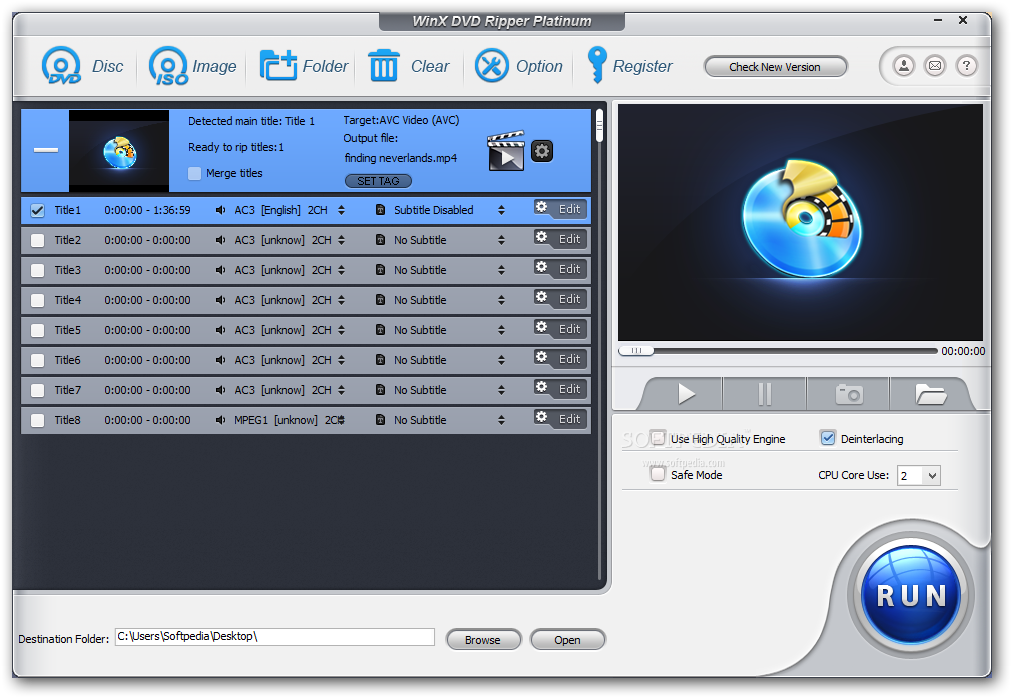
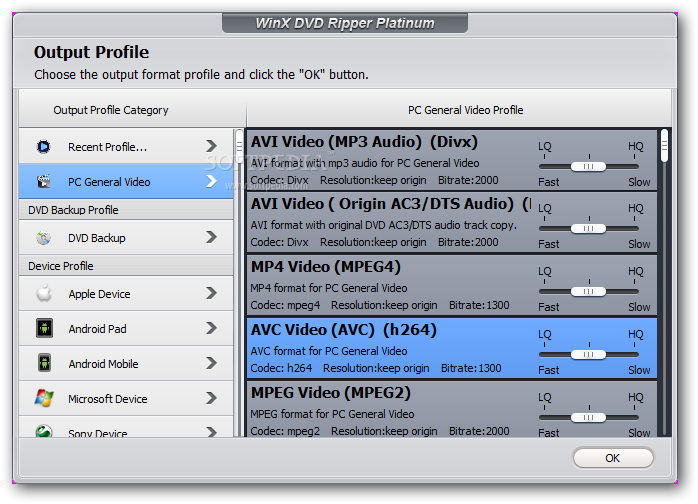
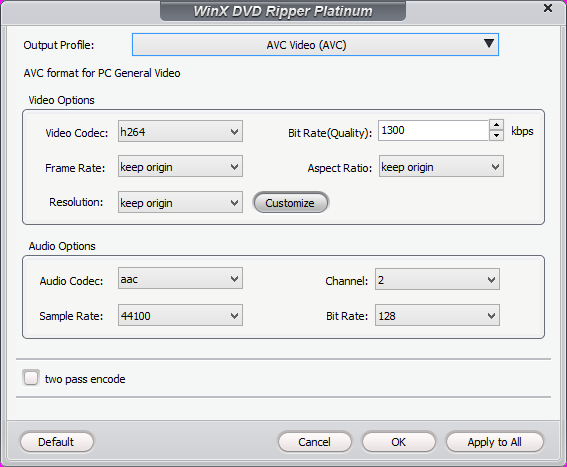
WinX DVD Ripper Platinum  ง่ายและเร็วที่จะช่วยให้คุณแปลง "DVD" เป็นไฟล์วีดีโอฟอร์แมทต่างๆ รองรับ ..AVI | FLV | WMV | MPEG | MP4 | 3GP | etc.. ถึงแม้ "DVD" นั้นจะมีลิขสิทธิ์ป้องกันอยู่ก็สามารถถอดให้คุณได้ (CSS protected DVDs / Sony ArccOS DVDs and all region 1-6 DVDs) แปลงเสร็จแล้วสามารถโหลดลง ..Sony PSP / Apple iPhone / iPod / iTouch / Apple TV / Zune / Mobile phone / etc.. ให้คุณได้ทันที พกพาไปดูในที่ต่างๆ สะดวกดีจริงจ้า  ^__^
Release Date : 19/03/2010

ScreenShots

.
..

.
..

Homepage : http://www.winxdvd.com/dvd-ripper-platinum/
Platforms : Windows 98 / NT / 2000 / 2003 / XP / Vista (32 & 64 bit) and Windows 7 (32 & 64 bit)
Supported DVD : Normal DVD / CSS protected DVD / region 1-6 / Sony ArccOS / Commercial DVD
Output files : AVI / WMV / FLV / MP4 / MPEG / iPod / iPhone / Apple TV / PSP / PDA / 3GP / Zune / Music / XviD / DivX / JPG / BMP
ภาษาอังกฤษ ดูคุณสมบัติกันแบบละเอียดได้เลยครับ
Functions & Features : ฟังก์ชั่นและคุณสมบัติการใช้งาน
Powerful Functions
Support ripping DVD video / extracting audio / grabbing screenshot and enable users to fully control output video quality or size by freely adjusting parameters.
Advanced Technology
Build in powerful and high speed encoding engine support multi-core CPU automatically detect and connect converted videos to portable devices and fully compatible with Windows 7.
Easy and Fast
WinX DVD Ripper Platinum is a one-click solution for DVD ripping. It is suitable for all levels of experienced users or even novices. And we promise it owns the fastest ripping speed.
Lifetime Automatically Free Upgrade
We offer lifetime free upgrade for WinX DVD Ripper Platinum payment users. Once a new version published WinX DVD Ripper Platinum will be upgraded without any charge.
Key Features : คุณสมบัติของโปรแกรม
* Multi-core CPU supported your conversion process will be much faster
* Batch rename all clips easily with “Renaming Template” before converting
* Rip DVD to popular video formats as AVI / FLV / WMV / MPEG / MP4 / etc
* Rip DVD to popular portable devices including iPhone / iPod / PSP / PDA / Zune / Mobile phone / etc
* Support automatically detecting connecting and transferring converted videos to portable devices
* Rip DVD audio into MP3 music file
* Support grabbing screenshot from DVD video
* Automatically disable subtitles but enable users to choose
* All video/audio parameters adjustable for users optimizing video quality
* Best video/audio quality
* Easy to use and 100% stable
* With Powerful and high speed encoding engine inside Platinum Edition will enable users to rip and convert DVD video with much better video/audio quality.
* Multiple DVD source supported as normal DVD / CSS protected DVD / region 1-6 / commercial DVD / Sony ArccOS DVDs
++ รางวัลการันตีสักเล็กน้อย

======================================================
Credit : คนที่คุณก็รู้ว่าใคร

Thursday, April 8, 2010

3herosoft MP4 Video Converter Ver. 3.4.1 Build 0329


3herosoft MP4 Video Converter Ver. 3.4.1 Build 0329
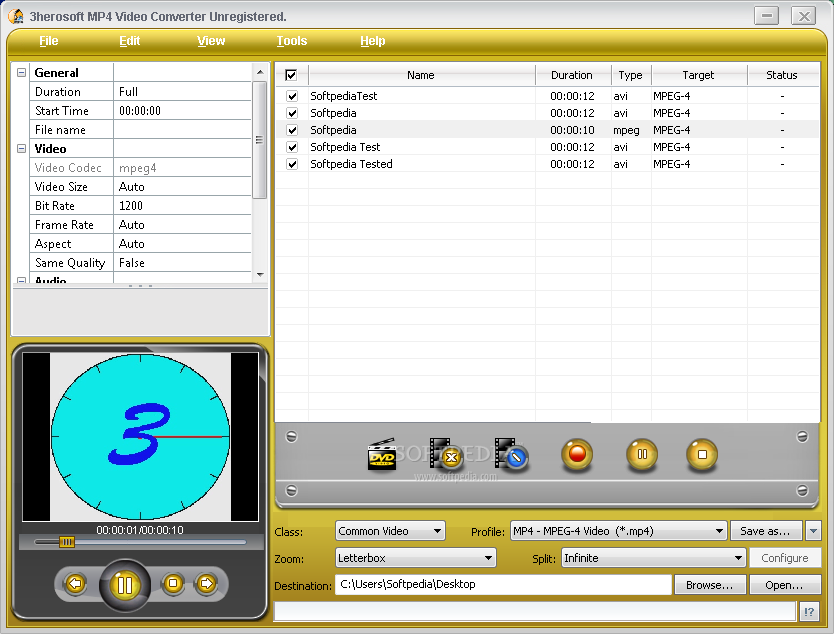
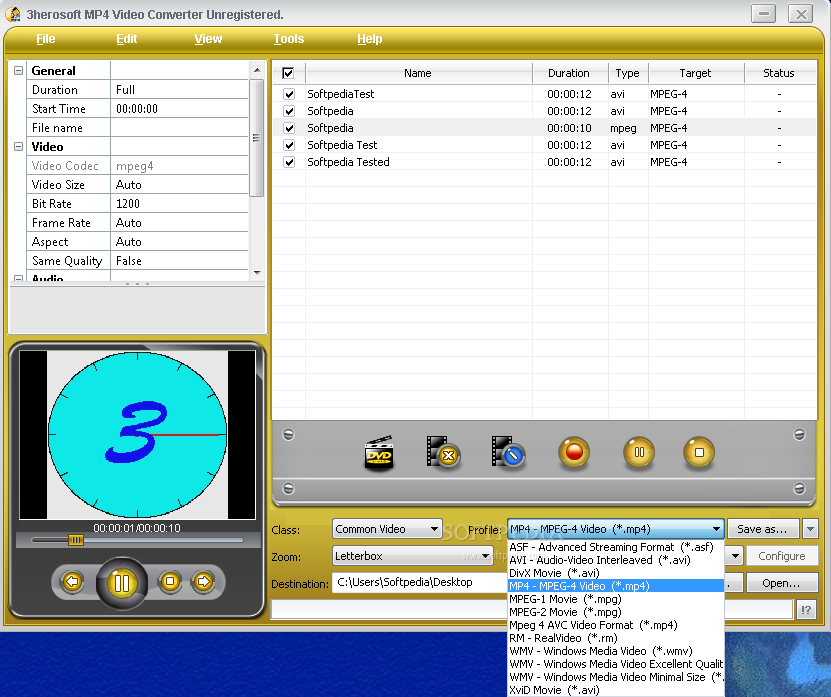
• เป็นโปรแกรมแปลงไฟล์วีดีโอขั้นมืออาชีพ ซึ่งสามารถแปลงรูปแบบวิดีโอต่างๆ ให้กลายเป็นไฟล์ฟอร์แมท "MP4" (MPEG4) โดยเฉพาะ รองรับการแปลงจากนามสกุลยอดนิยมได้มากมาย ไม่ว่าจะเป็น ..AVI | MPEG | DivX | MOV | RM | WMV | 3GP | VOB | H.264-MPEG-4 AVC | VCD | DV | etc.. และเมื่อแปลงเสร็จแล้วสามารถนำไปเปิดดูกับเครื่องเล่นแบบพกพาต่างๆ เช่น ..iPhone | iPod | PSP | Apple TV | Archos AV500 | Archos AV700 | Archos Gmini402 | iRiver PMP-100 | Creative Zen Vision | etc.. ได้อย่างง่ายดาย นอกจากนี้ยังรองรับการแปลงไฟล์ออดิโอเป็น MP3 | AAC | M4A ให้คุณภาพที่ยอดเยี่ยมอีกต่างหากจ้า  ^__^
Release Date : 29/03/2010

ScreenShots

.
..

Homepage : http://www.3herosoft.com/mp4-video-converter.html
Operating system : Windows NT/2000/XP/2003 and Windows Vista
ภาษาอังกฤษ ดูคุณสมบัติกันครับ
Key Features : คุณสมบัติของโปรแกรม
• Convert AVI / MPEG / DivX / MOV / RM / WMV / 3GP / VOB / VCD / DV to MP4 (MPEG4) format
• Extract and convert the audio file from a video one
• Support the conversion of audio/video clips with customized starting point and length
• All Encoders and Decoders are built in
• Support preview function
• Support H.264/MPEG-4 AVC encoding/decoding
• Support to adjust parameters of audio/video codecs
• Fastest Conversion Speed
• Support multi-threading and batch conversion
• Support to set different zooming modes for the output file
• Support to set different splitting modes for the output file
• Support to set the name of the output file
• Support to edit the ID3 tag
• Support to view the source file information
• Support multiple skins
• Support multiple languages such as simplified Chinese and English
==========================================================

Credit : คนที่คุณก็รู้ว่าใคร

Sunday, March 28, 2010

4Videosoft Video Converter Platinum Ver. 3.3.10


4Videosoft Video Converter Platinum Ver. 3.3.10
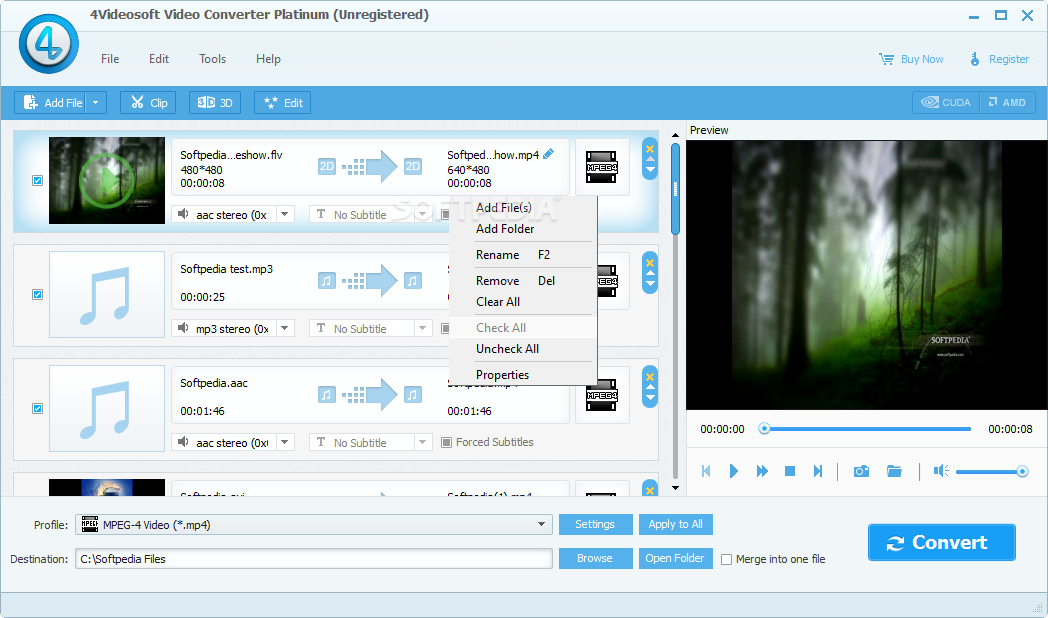
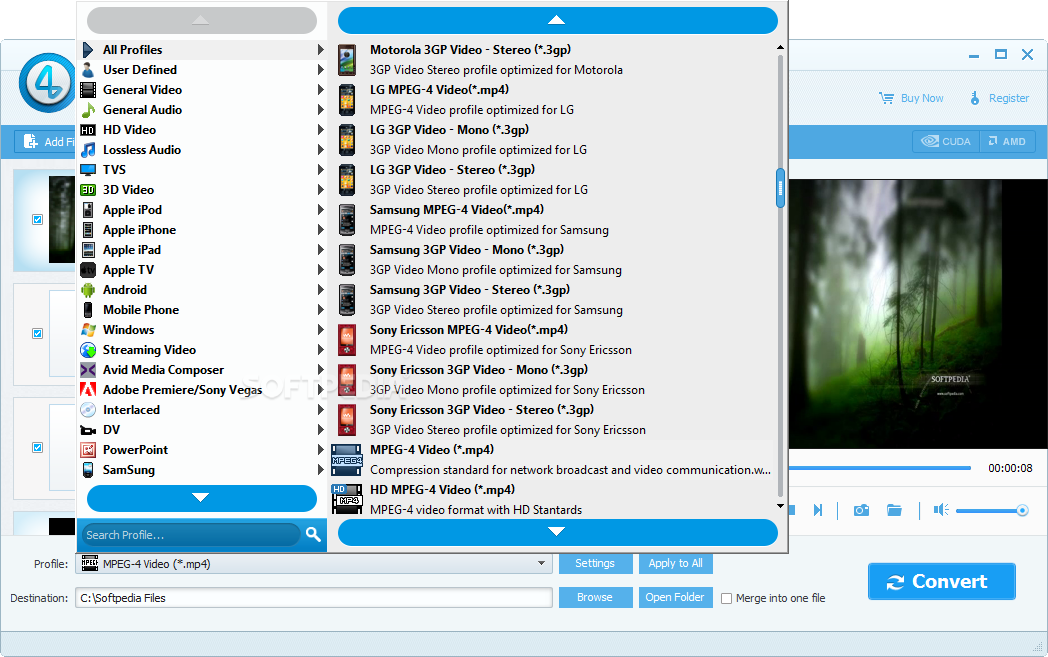
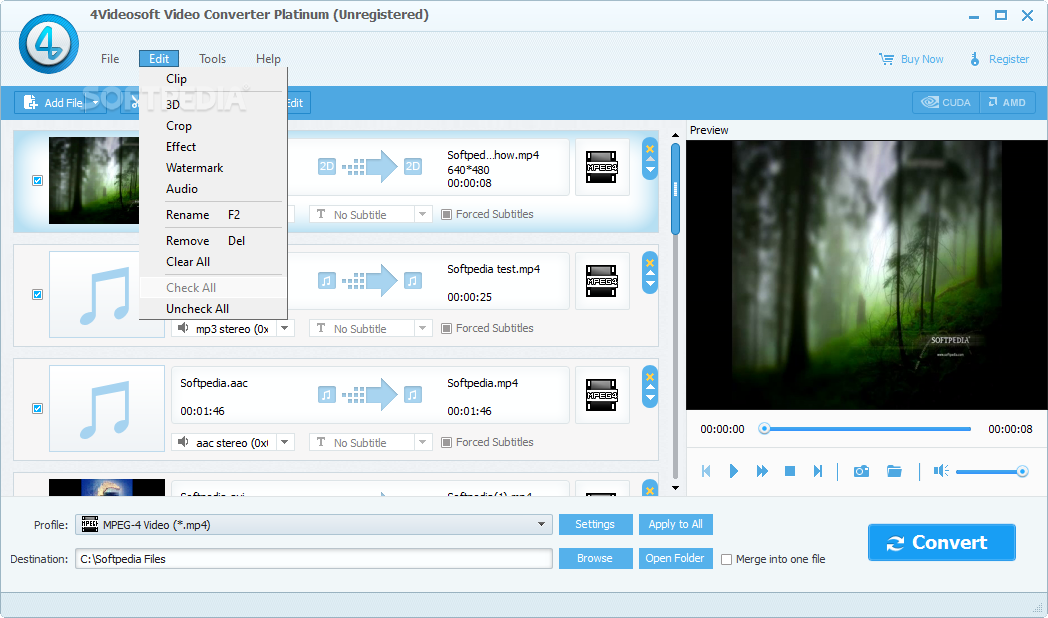
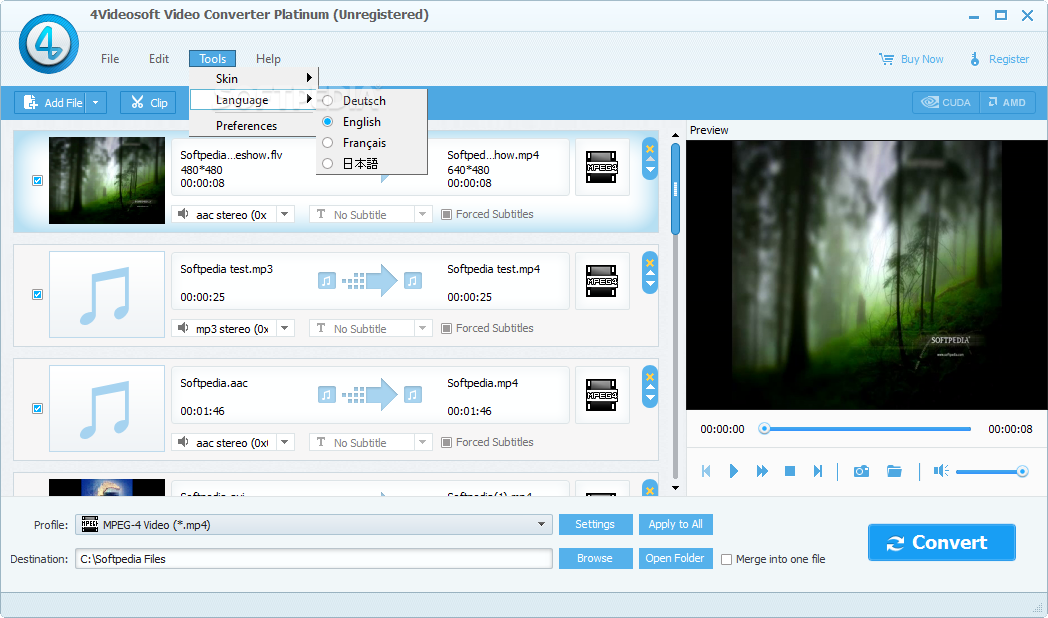
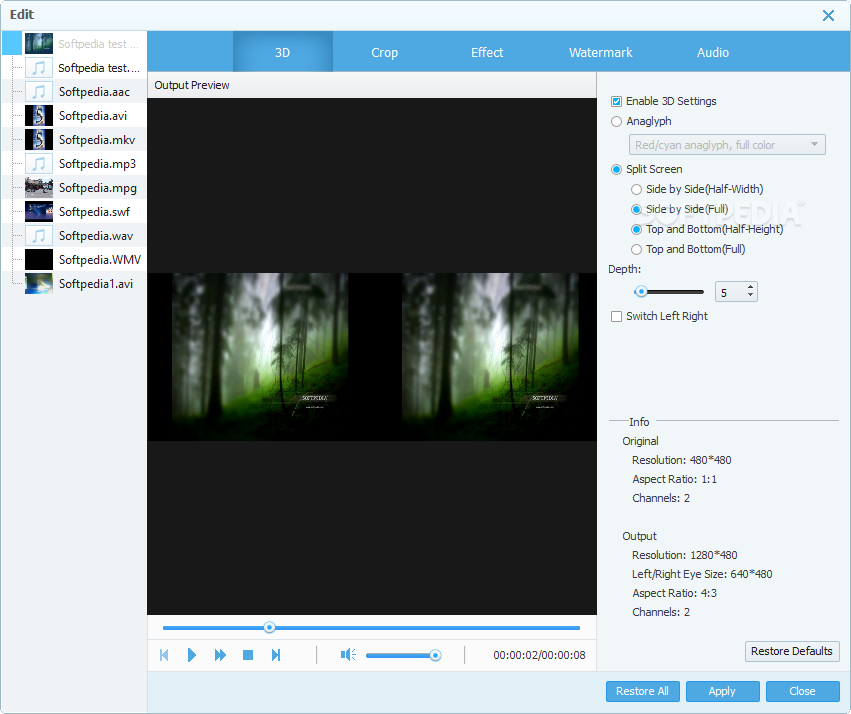
• เป็นโปรแกรมสำหรับใช้ในการแปลงไฟล์วีดีโอขั้นสูง รองรับนามสกุลยอดนิยมได้มากกว่า 30 นามสกุล อาทิ เช่น ..MPG | MPEG | MPEG2 | MP4 | H.264 | SWF | FLV | VOB | MOD | M4V | AVI | WMV | 3GP | 3GPP | MOV | DivX | XviD | QuickTime Video | DV | MJPG | MJPEG | MPV | HD TS | HD MPG | HD MPEG | HD MP4 | HD AVI | MP3 | MP2 | AAC | AC3 | WAV | WMA | M4A | RM | RAM | OGG | AU | AIF | AIFF | APE | FLAC | NUT | etc.. โดยที่ยังคงคุณภาพหลังจากการแปลงเอาไว้ให้คุณได้อย่างดีเยี่ยม และแปลงได้อย่างรวดเร็วอีกต่างหากจ้า  ^__^
Release Date : 22/03/2010

ScreenShots

.
..

.
..

.
..

.
..

.
..

Homepage : http://www.4videosoft.com/video-converter-platinum.html
OS Supported : Windows NT4/2000/2003/XP and Windows Vista
ภาษาอังกฤษ ดูคุณสมบัติกันแบบละเอียดได้เลยครับ
Key Functions : ฟังก์ชั่นการใช้งาน
Support the mutual conversion between all the popular video and audio formats
4Videosoft Video Converter Platinum supports all the video and audio formats. Then it can convert them into any other formats.
Extract audio from video
Convert video to only the audio for your listening.
Video Splitter
4Videosoft Video Converter Platinum has the trim function. It means that you can get any time-length video clips from your video sources.
Video Cropper
Adjust the size of video play region and the output aspect ratio to get the perfect playing effect.
Video Joiner
Merge your selected video sources into one file after conversion for you to enjoy successively.
Support preview and adjust video effect
You can preview the original video and output video effect at the same time with the assistance of Video Converter Platinum and adjust the video effects by modifying the video Contrast / Brightness / Saturation.
Key Features : คุณสมบัติของโปรแกรม
Easy to use
4Videosoft Video Converter Platinum is really easy to use. The whole process of conversion can be finished in few clicks.
Set all the parameters
All the parameters of profile can be provided for you to choose the exact settings for your players.
- Adjust Video Settings : Encoder / Resolution / Frame Rate / Video Bitrate
- Adjust Audio Settings : Encoder / Sample Rate / Channels / Audio Bitrate
- Input you want Video Resolution parameter in the form of Width (pixels) * Height (pixels) all those parameters can be saved as user defined profile for your future use.
Support Deinterlacing effectively
Deinterlacing can be done to improve the video quality by converting interlacing video to the opposite of it - progressive video (picture quality more clearly).
Take Snapshot
Capture your favorite pictures when you preview. It can be saved in the default folder automatically.
Fastest conversion speed
Provide the fastest conversion speed (>300%) completely support dual core CPU.
Why choose 4Videosoft Video Converter Platinum? : ทำไมต้องเลือก 4Videosoft Video Converter Platinum?
• 4Videosoft Video Converter Platinum is possessed of strong converting and editing functions.
• 4Videosoft Video Converter Platinum is really easy to operate associated with fastest conversion speed.
• Once you buy it you can free upgrade it for the whole life.
• 4Videosoft Studio provides you 7*24 online email support service for you to solve the puzzles immediately.
++ รางวัลการันตีสักเล็กน้อย!

-------------------------------------------------------------------------------------------------------------------------
Credit : คนที่คุณก็รู้ว่าใคร

Monday, March 22, 2010

ImTOO Blu Ray Ripper Ver. 5.2.4 Build 0312


ImTOO Blu Ray Ripper Ver. 5.2.4 Build 0312
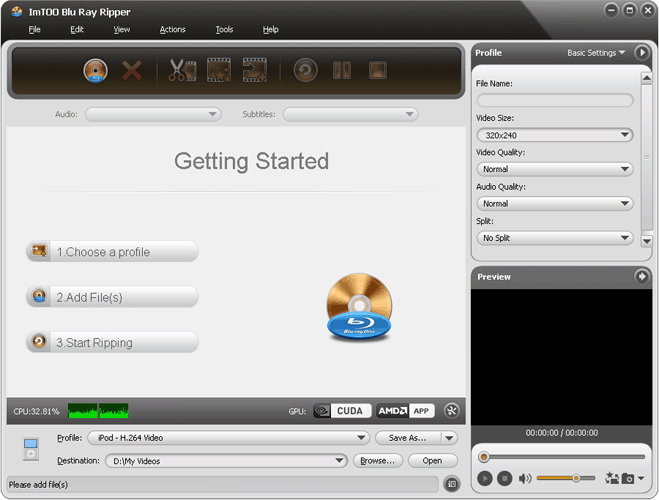
ริป "Blu-ray" เป็นไฟล์วีดีโอและออดิโอนามสกุลยอดนิยมได้มากมายรวมถึง ..AVI | MPEG | WMV | DivX | MP4 | H.264/AVC | RM | MOV | XviD | 3GP | FLV | MP3 | WMA | AAC | WAV | OGG | FLAC | APE | M4A | RA | AC3 | MP2 | AIFF | AMR | SUN AU.. ริปให้คุณได้อย่างขั้นมืออาชีพเค้าทำกันเลยทีเดียวเชียว!
Release Date : 12/03/2010

ScreenShots

.
..

.
..

.
..

Homepage : http://www.imtoo.com/blu-ray-ripper.html
OS : Windows XP (SP2 or later) / Windows Vista
ภาษาอังกฤษ ดูคุณสมบัติกันแบบละเอียดได้เลยครับ
Main Functions : ฟังก์ชั่นการใช้งาน
Rip Blu-Ray DVD to HD Videos
Rip Blu-ray movies to HD videos : H.264/MPEG-4 AVC | AVCHD Video (*.m2ts / *.mts) | Apple TV h.264 720P | HD WMV | MPEG2/MPEG-4 TS HD Video.
Blu-Ray M2TS Video Converter
Convert Blu-Ray M2TS video to common videos including AVI | MPEG | WMV | DivX | MP4 | H.264/AVC | RM | MOV | XviD | 3GP and FLV.
Blu-Ray DVD Audio Extractor
Extract audio from your favorite Blu-ray DVD discs and convert to MP3 | WMA | AAC | WAV | OGG | FLAC | APE | M4A | RA | AC3 | MP2 | AIFF | AMR | SUN AU Format.
Capture Blu-Ray Disc Movie Image
Capture movie image from Blu-ray DVD and convert Blu-ray DVD movie to pictures according to the specified interval and duration.
The Ability to Trim / Crop / Merge and Split Video
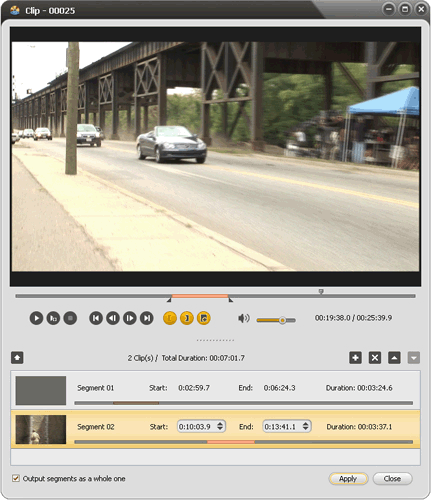
Provide a simple way to trim your desired segment of the M2TS file / crop video playing area to fit your player screen / merge the single files into one file and split a large file into several smaller clips.
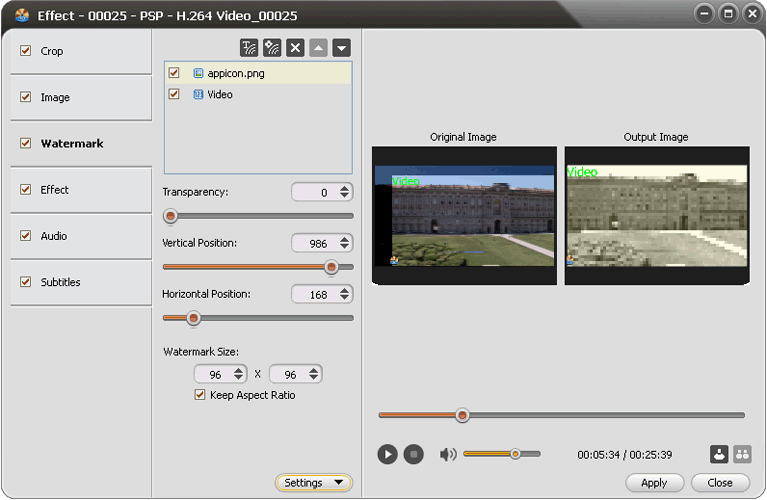
Personalize Video with Watermark and Effects
Allow you to add picture watermark or text title to your video and add special artistic effects like gray / negative / old film to make a Holly-wood style movie.
Key Features : คุณสมบัติของโปรแกรม
* The output videos can be playback on multiple devices like iPod | iPhone | Apple TV | PSP | Xbox | Zune | NDS | Wii | mobile phone | PMP.
* ImTOO Blu Ray Ripper enables you to set the video image effects like Brightness / Contrast and Saturation.
* Real-time preview allows you to compare the original video with the fixed one in two preview windows to get your desired effects.
* Directly modify the start time and duration to convert any desired segment of the Blur-ray DVD movie.
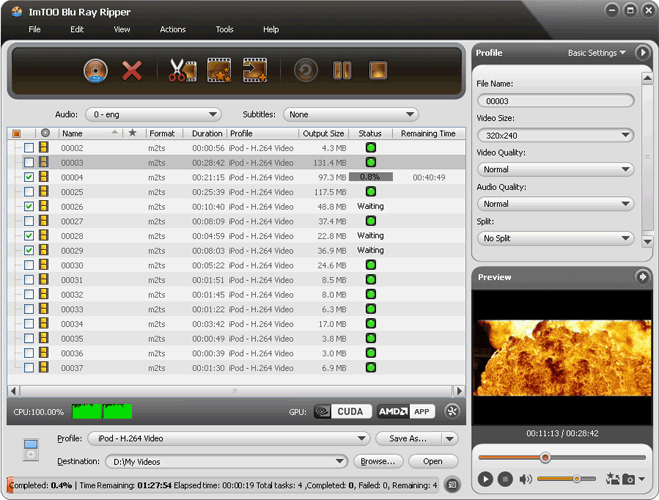
* Batch conversion helps you convert more than one file in batches at a time with a few clicks.
* Able to adjust video and audio parameters : resolution / bit rate / frame rate / sample rate / resolution / codec / quality.
* Change the output file size you want in Bitrate Calculator and specify the duration and audio bit rate.
* Conversion-done actions will help you automatically shut down computer / exit program / hibernate or standby.
* The Blu-ray DVD disc ripper can work in the background to finish the conversion and consume less resource.
* Take a snapshot of your favorite pictures when previewing your Blu-ray Disc movies and choose to save them as JPG | GIF | PNG or BMP format.
===========================================================================
ราคาขายในเวบอยู่ที่ $45.95 ครับผม ดูได้จากที่นี่จ้า : http://www.imtoo.com/webapp/pay.php?product_code=blu-ray-ripper
Credit : คนที่คุณก็รู้ว่าใคร

Thursday, December 3, 2009

Sumatra PDF Ver. 1.0.1


Sumatra PDF Ver. 1.0.1
         • โปรแกรมอ่านและสั่งพิมพ์ไฟล์ PDF ขนาดมินิ สำหรับผู้ที่ใช้วินโดวส์  ถ้าใครเบื่อ Adobe Reader ที่โหลดช้าและกินหน่วยความจำเหลือเกิน กระผมขอแนะนำ Sumatra PDF เลยครับ ขนาดตัวติดตั้งเพียงแค่ 1 MB เท่านั้น (ในขณะที่ Adobe Reader นี่ ขนาดใหญ่กว่าถึง 22 MB!)
         • แน่นอนว่าตัวเล็กๆ อย่างนี้ ความสามารถคงจะสู้ Adobe Reader ไม่ได้แน่ โดยเจ้าโปรแกรม Sumatra PDF ทำได้แค่เปิดไฟล์ PDF ขึ้นมาอ่านและสั่งพิมพ์ให้เราเท่านั้น (แต่ปกติเราก็ใช้กันอยู่แค่นี้นี่นา จริงไหม!!)
==> อยาก Preview ไฟล์ PDF แบบเบาเบา เชิญรับไปทดสอบกันได้เลยครับ!! ....

ScreenShots

.
..

.
..

Homepage : http://blog.kowalczyk.info/software/sumatrapdf/
OS Supports : Windows XP/2003/Vista
ภาษาอังกฤษ ดูคุณสมบัติกันครับ
Sumatra can do for you : ทำไรได้มั่ง
* open PDF files via menu
* open PDF files via drag & drop
* set different zoom levels via menu
Changes in Sumatra PDF 1.0.1 : เปลี่ยนแปลงอะไรในเวอร์ชั่นนี้บ้าง
======================
* many memory leaks fixed (Simon Bunzli)
* potential crash due to stack corruption (pointed out by Christophe Devine)
* making Sumatra default PDF reader no longer asks for admin priviledges on Vista/Windows 7
* translation s
_____________________________________________________________
Sumatra PDF is a slim  free  open-source PDF viewer for Windows!
_____________________________________________________________

Credit : คนที่คุณก็รู้ว่าใคร

Thursday, June 4, 2009

Arial CD Ripper Ver. 1.9.5


Arial CD Ripper Ver. 1.9.5
• เป็นโปรแกรมที่ใช้งานได้ง่าย สำหรับการริปเพลง โดยสามารถเลือกเพลงใดเพลงหนึ่งหรือทั้งหมดจากแผ่นซีดีเพลง และยังใช้แปลงไฟล์เสียง Audio ให้เป็นฟอร์แมทต่างๆ ได้อีก ซึ่งโปรแกรมนี้สามารถแปลงรูปแบบเสียงที่นิยมใช้กันเป็นส่วนใหญ่จากรูปแบบ หนึ่งไปเป็นอีกรูปแบบหนึ่ง และใช้ดึงเพลงแต่ละเพลงในซีดีที่คุณชื่นชอบออกมาได้ โดยสามารถเปลี่ยนเป็นไฟล์นามสกุล *.mp3 / *.wav / *.ogg / *.flac / *.ape  พร้อมทั้งสนับสนุนการใช้งาน ID3v1 Tag Editor อีกด้วยจ้า...
Release Date : 01/06/2009


Homepage : http://www.xrlly.com/cd-ripper.htm
OS : Windows 2000 / XP / Vista
ภาษาอังกฤษ ดูคุณสมบัติกันครับ
Features : คุณสมบัติของโปรแกรม
• Convert CD tracks to MP3 (.mp3)
• Convert CD tracks to WAV (.wav)
• Convert CD tracks to OGG (.ogg)
• Convert CD tracks to FLAC (.flac)
• Convert CD tracks to APE (.ape)
• Get audio CD info(artist title etc) from CDDB server
• Convert MP3 to any formats among MP3 WAV OGG FLAC APE
• Convert WAV to any formats among MP3 WAV OGG FLAC APE
• Convert OGG to any formats among MP3 WAV OGG FLAC APE
• Convert FLAC to any formats among MP3 WAV OGG FLAC APE
• Convert APE to any formats among MP3 WAV OGG FLAC APE
• ID3v1 Tag Editor
• Batch and High Speed Audio Conversion
• Right-Click Quick Convert
• Audio CD Player
• MP3/WAV/OGG/FLAC/APE Player
..........................................................................................
Arial CD Ripper - Batch convert CD to MP3/WAV/OGG/FLAC/APE!
..........................................................................................

Credit : คนที่คุณก็รู้ว่าใคร

BS.Player Pro


BS.Player Pro Ver. 2.41 Build 1001 Beta
BS.Player Pro  โปรแกรมเล่นไฟล์ Multimedia ที่มีชื่อเสียงระดับโลก เป็นโปรแกรมอันดับต้นๆ ที่ผู้ใช้งานส่วนใหญ่เลือกใช้ สำหรับ ดูหนัง ฟังเพลง มีสกินให้เลือกปรับเปลี่ยนตามที่ใจคุณต้องการมากกว่า 100 Skins รองรับไฟล์ยอดนิยมมากมาย เช่น divx / avi / mpeg 1 / mpeg 2 / xvid / 3ivx / ogm / matroska / asf / wmv / DV / m1v / m2v / Quicktime mov / mp4 / mpv / QT / Real rm / SWF / vob / wav / mpa / mp1 / mp2 / mp3 / ogg / aac / ac3 / aif / ram / wma... เมืองนอกการันตีความสามารถ เมืองไทยตามน้ำหน่อยดีก่า เอิ้กส์ เอิ้กส์ !!
Release Date : 01/06/2009


Homepage : http://www.bsplayer.org
Platform : Windows 2000 / XP / Vista
ภาษาอังกฤษ ดูคุณสมบัติกันแบบละเอียดได้เลยครับ
Main features of BS.Player are : คุณสมบัติของโปรแกรม
• Sound Equalizer
• Fully skinnable windows (Media list  Play list  Equalizer)
• Bookmarks support (add  edit)
• Chapters support (create  move to  skip)
• Custom aspect ratios
• Multiple audio stream switching
• Frame capture (video to picture)
• Plugin support (Winamp DSP plugins and others)
• Multilingual interface
• Fast forward and fast rewind option
• Frame stepping (playback video one frame at a time)
• WinLIRC support (user defineable remote controllers)
• Support switching between multiple (different language) subtitles
• Pan-scan and custom pan-scan option
• Support for multiple audio streams and switching between them
• Every action can also be assigned to WinLIRC button
• Playback of incomplete AVI files and locked files (files in use  files still downloading or recording)
• Command line support (for example "bsplayer.exe movie.avi -fs" will start playback of movie in full screen mode)
• Support a lot of subtitles formats (MicroDVD  SubRip  Subviewer...)  custom subtitles position  color  font  transparency...
• BSI/INI files support and dynamic DirectShow filters loading (so everything can be burned on CD and played without installing anything)
• Almost every action can be assigned to user selected key (even two keys) and different keys can be assigned for full screen and windowed mode
• Support for all popular media formats (audio and video): divx  avi  mpeg 1  mpeg 2  xvid  3ivx  ogm  matroska  asf  wmv  DV  m1v  m2v  Quicktime mov  mp4  mpv  QT  Real rm  SWF  vob  wav  mpa  mp1  mp2  mp3  ogg  aac  ac3  aif  ram  wma...
What does the BS.Player 2.4 Pro have to offer : เพิ่มเข้ามาในซีรีส์ 2.4
* Playback of AVCHD video new. (Advanced Video Codec High Definition) format used in Canon / JVC / Panasonic and Sony digital tapeless camcorders.
* Support for global multimedia keys
* Play YouTube streaming including HD / High Quality and Normal resolution video
* Save YouTube streaming video to local disk (YouTube downloader)
* Customizable Equalizer
* Support for Capture/Tuner devices (and Teletext support)
* Capture Video to file
* Integrated subtitle editor
* Network file buffering
* Support for Flash playback
* Technical e-mail support
* DVD support
* Text "Only for Non-Commercial use" is removed in PRO version
* Free one year subs--cription upgrade
- - - - - - - - - - - - - - - - - - - - - - - - - - - - - - - - - - - - - - - - - - - - - - - - - - -
BS.Player PRO 2.x gives you even more multimedia experience
- - - - - - - - - - - - - - - - - - - - - - - - - - - - - - - - - - - - - - - - - - - - - - - - - - -

Credit : คนที่คุณก็รู้ว่าใคร

Thursday, May 21, 2009

Video Converter Ver. 5.2.12


#1 Video Converter Ver. 5.2.12
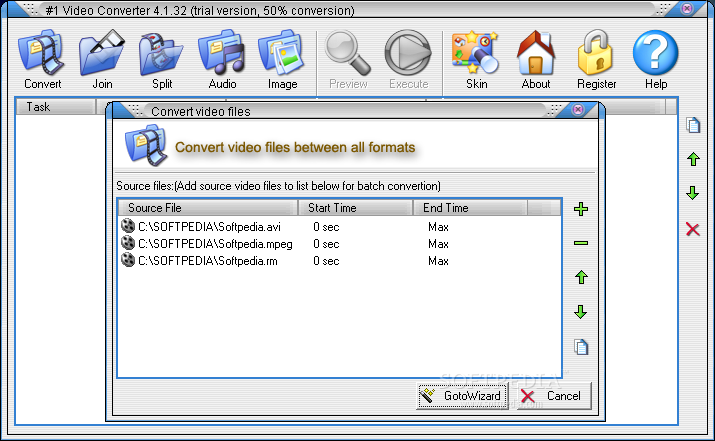
เป็นโปรแกรมที่ใช้งานง่ายและน่าใช้อีกตัวนึงเลยครับ Interface ก็ไม่ขี้เหร่ซะด้วย ลองเอาไปเล่นดูกันเลยครับ แจ่ม แจ่ม !! @_@

Screenshots

.
..

.
..

.
..

.
..

.
..

Homepage : http://www.videotox.com
Design for : Windows 95/Windows 98/Windows Me/Windows 2000 and Windows XP
ภาษาอังกฤษ ดูคุณสมบัติกันเลยครับผม
Key Features : คุณสมบัติของโปรแกรม
* Extreme fast Conversion speed.
* Supports AVI  MPEG1  MPEG2  ASF  WMV  Divx  xvid.
* All supported formats to MPEG1.
* All supported formats to MPEG2.
* All supported formats to VCD  SVCD  DVD (PAL NTSC)
* All supported formats to AVI (DivX XviD  MPEG-4)  
* All supported formats to Windows Media Format (WMV/ASF)
* Joints video files to a large one.
* Splits large video file to smaller clips.
* Specifies start and end position while convert and joint.
* Batch file conversion .
* Extracts audio tracks from all supported video formats to mp3  wma  wav.
* Extracts images from all supported video formats.
* Preview result before long time execution.
* Backup DVD Disk(.VOB) to all supported formats.
* Backup DVD Disk(.VOB) music to mp3  wav  wma.
* Backup VCD Disk(.DAT) to all supported formats.
* Backup VCD Disk(.DAT) music to mp3  wav  wma.
++ รางวัลการันตีนิดหน่อย

========================================================

Credit : คนที่คุณก็รู้ว่าใคร